
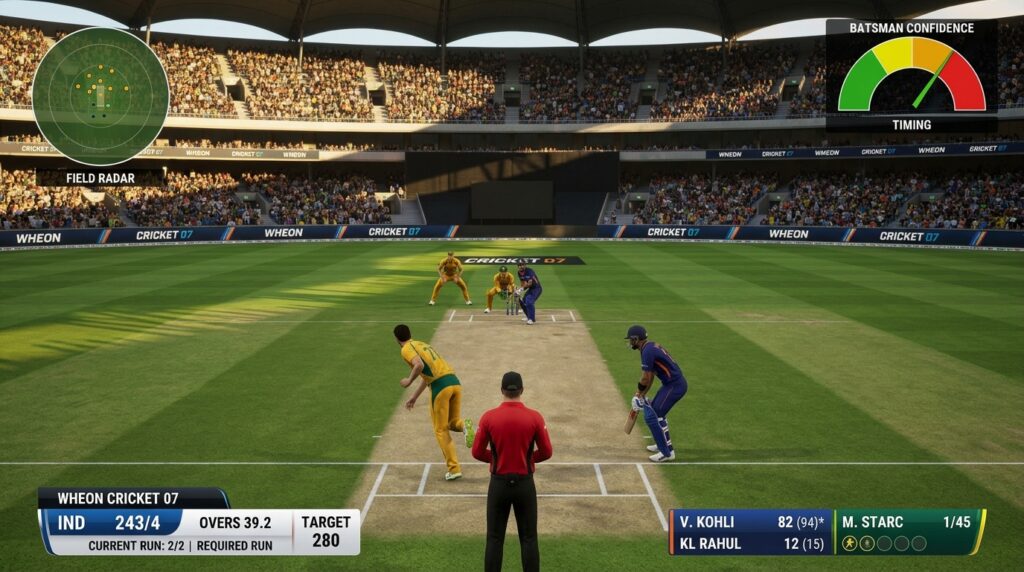

Remember those late nights in the mid-2000s, controller in hand (or keyboard if you were old-school), trying to time a perfect cover drive while the commentator called every shot with that familiar EA voice? EA Sports Cricket 07 captured something pure about the game. Two decades later, that same title still draws crowds of players, only now it arrives dressed up with modern squads, sharper stadiums, and community-driven updates under the name Wheon Cricket 07.
Wheon Cricket 07 is the fan-powered overhaul that keeps the classic engine alive for PC gaming enthusiasts, nostalgic sports gamers, and anyone who still prefers the feel of 2007 cricket over flashier modern simulations. It takes the original 2006 release and layers on updated team rosters, HD graphics patches, IPL and other league modes, commentary tweaks, and stadium overhauls. The result feels both familiar and current. This guide walks through the features, installation steps, roster updates, and the reasons the mod retains its cult status among cricket gaming lovers.
What Exactly Is Wheon Cricket 07?
Wheon Cricket 07 is not an official EA Sports product. It is a community-built enhancement of EA Sports Cricket 07. Dedicated modders and fans maintain it through patches that refresh player names, faces, kits, tournaments, and visuals. The core gameplay, physics, and control scheme stay rooted in the 2007 engine, which is exactly why many prefer it. Modern cricket titles often demand high-end hardware and sometimes feel overcomplicated. Wheon Cricket 07 runs on modest PCs while delivering recognizable current stars and competitions.
The original game shipped with 2006-era squads and limited tournament options. Fans refused to let it fade. Through sites and forums focused on Cricket 07 content, they created ongoing updates that turn the old title into a living platform. You get real-life player attributes, franchise teams from the IPL, and improved presentation without abandoning the nostalgic core.
Why Wheon Cricket 07 Still Matters in 2026
Plenty of newer cricket games exist, yet this mod keeps pulling players back. Accessibility sits at the top of the list. Minimum system needs remain low, so older laptops and office machines can handle it. Nostalgia plays a big role too. Players who grew up with Cricket 07 return for the same shot timing, bowling feel, and camera angles they remember, only now with Virat Kohli, Babar Azam, and current IPL lineups instead of 2006 names.
Community support forms another strength. Roster patches arrive after major tournaments or auctions. HD graphics packs improve pitches, kits, and stadium lighting. Commentary and crowd sound updates add atmosphere. Unlike locked-down commercial titles, this version encourages experimentation. You can swap face packs, add stadiums, or install an IPL patch Cricket 07 package without fighting restrictive licensing walls.
A quick comparison helps clarify the appeal:
| Aspect | Original EA Sports Cricket 07 | Wheon Cricket 07 |
|---|---|---|
| Squads | 2006 lineups | Updated 2024-2026 international and franchise teams |
| Graphics | Standard definition | HD textures, face packs, stadium overhauls |
| Tournaments | Limited | IPL, PSL, BBL, World Cup modes |
| Hardware Demand | Very low | Still low, runs on older PCs |
| Mod Support | Minimal | Extensive community patches |
| Nostalgia | Pure | Preserved with modern layers |
The table shows why many call Wheon Cricket 07 the practical choice for classic cricket game download seekers who want relevance without high system requirements.
Key Features That Define the Experience
Wheon Cricket 07 packs several upgrades that transform the base game.
Updated Player Rosters and Teams
International sides receive current names, approximate skill ratings, and roles. Franchise sides appear with accurate IPL kits and squads. You can field CSK, MI, RCB, or KKR lineups that reflect recent auctions and form. Domestic and other T20 leagues often receive attention as well. Roster managers and community files make swapping or refreshing these lists straightforward.
High-Definition Graphics and Stadium Overhauls
HD graphics patches replace older textures with clearer pitch surfaces, improved lighting, better shadows, and sharper player kits. Stadium graphics overhaul packs bring venues closer to real-world looks, complete with updated banners, scoreboards, and crowd elements. These changes stay lightweight, so the game still performs well on modest hardware.
Modern Tournaments and Modes
Exhibition matches remain, yet the real draw comes from structured competitions. Full IPL seasons, World Cup brackets, Ashes series, BBL, PSL, and custom tournament creators let you play through contemporary calendars. Some packs add 100-ball formats or career-style progression.
Commentary, Audio, and Atmosphere
Commentary patches refresh the audio experience. Crowd reactions feel more dynamic. Ball impact and ambient stadium sounds receive attention in many popular packs. The result sits closer to a modern broadcast without rewriting the original engine.
Gameplay Tweaks and Customization
Community patches refine batting timing windows, bowling responsiveness, and AI behavior. Shot selection and fielding feel smoother for many players. Unlimited mod support means you can layer face packs, bat designs, score overlays that mimic television graphics, and widescreen fixes.
These elements combine into a PC sports simulation that rewards both casual sessions and longer tournament runs.
How to Install Wheon Cricket 07: A Practical Guide
Installation stays simple if you follow a clean process. Always start with a trusted source for files. Avoid random download sites that may bundle unwanted software.
- Obtain a working base copy of EA Sports Cricket 07. Install it to a clean folder (for example, C:\Games\Cricket07). Confirm the original game launches before adding mods.
- Download the Wheon Cricket 07 patch or full setup package from a reputable community site or mod archive. Files usually arrive as ZIP or RAR archives.
- Extract the contents using WinRAR or 7-Zip.
- Copy the extracted files into the main Cricket 07 directory. Choose to overwrite existing files when prompted. Keep a backup of the original folder if you want an easy rollback.
- For additional patches (roster updates, HD kits, stadium packs), repeat the copy-and-overwrite step. Many include a simple readme with folder placement notes.
- Launch the game executable. On Windows 10 or 11, right-click the .exe, open Properties, set Compatibility mode to Windows XP (Service Pack 3), and tick “Run as administrator.” These steps resolve most modern OS conflicts.
- Inside the game, load the new roster if the patch requires it (often through My Cricket or similar menus).
Common issues include crashes after heavy mod stacking or missing DirectX components. Running as administrator and applying one major patch at a time usually solves them. Widescreen and HUD fixes improve the interface on modern monitors.
System Requirements for Smooth Play
Wheon Cricket 07 remains friendly to older machines.
Minimum
- OS: Windows XP / 7 / 8 / 10 / 11
- CPU: Pentium 4 (2.0 GHz) or equivalent
- RAM: 1 GB
- Graphics: 128 MB
- Storage: 2 GB
Recommended
- OS: Windows 10 or 11 (64-bit)
- CPU: Dual-core 2.5 GHz
- RAM: 4 GB
- Graphics: 512 MB dedicated
- Storage: 4 GB (more if stacking multiple HD packs)
Integrated graphics from the last decade handle the game without trouble. You do not need a high-end gaming rig.
Popular Mods and Roster Updates Worth Trying
The modding scene keeps the title fresh. Look for these categories:
- Latest roster patches that reflect current international and IPL squads.
- IPL-specific packs with franchise kits, logos, and stadium assignments.
- HD face packs and kit collections for visual realism.
- Stadium graphics overhaul sets for iconic grounds.
- Commentary and crowd sound updates.
- Broadcast overlay packs that modernize scorebugs and presentation.
- Gameplay balance patches that refine AI and physics.
Apply the largest “mega” pack first if one is available, then layer smaller specialized updates. Always back up before major changes. Community forums and dedicated Cricket 07 sites remain the best places to track the newest files.
Gameplay Feel and Tips for New and Returning Players
The controls retain the original responsiveness. Timing still matters for clean shots. Bowling rewards line and length more than pure pace spam. Fielding AI has improved in many patches, reducing some of the older frustration.
Start with exhibition matches to relearn the timing. Move into tournament modes once comfortable. Experiment with different pitch conditions and weather, as they influence swing and bounce. Camera angles offer broadcast, stump, and behind-the-batsman views. Many players settle on the classic broadcast-style angle for immersion.
Because the game is offline-friendly, you can play long sessions without worrying about servers or always-online requirements.
Wheon Cricket 07 vs the Original: Clear Differences
The original delivered pure 2006 cricket. Wheon Cricket 07 keeps that foundation and adds relevance. Updated team rosters replace retired players. HD graphics patches and stadium work lift the presentation. Modern tournaments fill the calendar. Compatibility tweaks let it run on current Windows versions. The modding freedom turns a finished product into an ongoing project. For players who value accessibility and nostalgia mixed with current names, the upgraded version wins.
Final Takeaways and Next Steps
Wheon Cricket 07 proves that a well-loved sports title can outlast its official support cycle when a passionate community steps in. The combination of classic gameplay, low system demands, frequent roster updates, and visual enhancements creates a package that still satisfies in 2026.
Quick next steps:
- Secure a clean base install of Cricket 07.
- Download a current Wheon Cricket 07 patch from a trusted community source.
- Apply the files carefully and set compatibility options.
- Load an updated roster and try an IPL or international match.
- Explore additional HD or stadium packs once the base mod works.
- Join community discussions to stay current with new releases.
Share your favorite patches or memorable matches in the comments. What roster update or stadium pack made the biggest difference for you? The conversation around this classic keeps the game alive.
Frequently Asked Questions
What is Wheon Cricket 07?
It is a community-modded version of EA Sports Cricket 07 that adds updated rosters, HD graphics, modern tournaments such as the IPL, and various visual and audio enhancements while keeping the original gameplay engine.
Is Wheon Cricket 07 free to download?
The original game requires a legal base copy. Community patches and mods are typically shared free by fans, though you should always use trusted sources and respect any licensing notes.
Can I run Wheon Cricket 07 on Windows 11?
Yes. Use compatibility mode set to Windows XP Service Pack 3 and run the executable as administrator. Most players report stable performance with these settings.
How do I update the team rosters?
Download the latest roster patch, extract it, and place the files in the correct game or documents folder as instructed in the readme. Some patches load automatically; others require selection inside the game menus.
Does it include current IPL teams?
Most recent Wheon Cricket 07 packages and dedicated IPL patches include the latest franchise squads, kits, and related content.
What are the best graphics upgrades?
Look for HD face packs, stadium texture overhauls, kit collections, and broadcast overlay mods. Apply them one category at a time after the core patch is stable.
Is online multiplayer available?
The original game focused on offline play. Community versions remain primarily single-player or local. True online support is limited compared with modern titles.
You May Also Like: Is the iOS eTrueSports App Safe? Features, Download Guide & Honest Review