
What if your procurement process could demonstrate its value before a buyer ever booked a meeting? That is the central idea behind PLG supplies: practical products, platforms, and workflows that make purchasing easier to start, faster to adopt, and more valuable as usage expands.
For procurement managers, supply chain professionals, B2B operations leaders, and SaaS executives, PLG supplies offer a useful way to rethink the buying experience. Instead of forcing every employee through a complex procurement process, organizations give users simple tools that help them find products, request purchases, compare suppliers, manage inventory, and track results.
The phrase “PLG supplies” is not yet a universally standardized procurement category. It is best understood as a product-led approach to procurement. The software or supply solution becomes the starting point for adoption, while actual usage creates measurable value. This reflects the wider product-led growth model, where a product drives acquisition, activation, retention, and expansion by helping users experience value quickly.
In this guide, we will explain what PLG supplies mean in procurement, identify the most important solution categories, explore integration challenges, and outline a practical implementation plan.
What Are PLG Supplies?
So, what are PLG supplies in procurement?
PLG supplies are procurement products, digital tools, consumables, and operational solutions designed around product-led adoption. They allow end users to begin with minimal assistance, experience a clear benefit, and expand usage as their needs grow.
In a traditional procurement model, the purchasing department often controls nearly every step. Employees submit requests through forms, wait for approvals, search approved catalogs, and contact procurement teams for help. This approach can provide control, but it may also create delays and encourage people to buy outside approved channels.
A product-led procurement model takes a different route. It gives users an intuitive experience and builds controls into the product itself.
For example, a PLG procurement platform might let an employee:
- Search an approved catalog using familiar language.
- Compare price, delivery time, and supplier information.
- Add items to a guided requisition.
- Apply the correct cost center automatically.
- Route the request to the right approver.
- Track the order without sending follow-up emails.
- Reorder frequently used items based on inventory data.
The product does more than process a transaction. It teaches users how to follow the right process through the interface.
That distinction matters. A conventional procurement system may contain every required feature, yet still fail if users find it confusing. PLG supplies focus on adoption, usability, and time to value. The goal is to make the compliant path the easiest path.
PLG supplies versus ordinary supplies
Ordinary supplies are physical or digital items an organization purchases for its operations. These might include packaging materials, office equipment, safety products, production components, software licenses, or maintenance parts.
PLG supplies include those items when they are connected to a product-led purchasing experience. They may also refer to the digital infrastructure that supports the experience.
| Area | Traditional procurement approach | PLG supplies approach |
|---|---|---|
| User entry | Formal training or procurement-led request | Self-service discovery and guided onboarding |
| Product experience | Users navigate complex forms | Users complete tasks through intuitive workflows |
| Adoption | Driven by policy and instruction | Driven by immediate usefulness |
| Approvals | Manual routing and email exchanges | Rules-based, automated routing |
| Inventory | Periodic spreadsheet updates | Real-time or near-real-time visibility |
| Expansion | Procurement adds more users | Successful users invite teams and expand usage |
| Measurement | Savings and compliance | Savings, adoption, time to value, and task completion |
The product-led approach does not remove procurement governance. Instead, it embeds governance into the user experience.
Why PLG Matters in Procurement
Procurement teams face pressure from several directions at once. They must reduce costs, protect supply continuity, improve compliance, support sustainability goals, and help employees move quickly. At the same time, many organizations still rely on disconnected systems, manual approvals, and outdated supplier data.
PLG supplies can address the user experience problem at the heart of these challenges.
A procurement process may be technically efficient but practically difficult. If a requester cannot find the correct item, the person may email a buyer, use an old supplier link, or purchase from an unapproved marketplace. Every workaround increases the risk of maverick spending, duplicate orders, and poor visibility.
A product-led solution reduces friction at the point where demand begins.
Faster time to value
Time to value is the period between a user first accessing a solution and achieving a useful outcome. In procurement, that outcome might be creating a compliant requisition, finding a lower-cost supplier, or preventing a stockout.
A strong PLG supplies solution reduces unnecessary steps. Users should not need to understand the entire procurement architecture before completing a simple task.
For instance, a warehouse supervisor may not care about the organization’s supplier segmentation model. The supervisor does care about finding the correct replacement component before a production line stops. A well-designed interface can present the right item, supplier, approval rule, and delivery information without requiring the supervisor to understand the system behind it.
Higher user adoption
Procurement software often fails because implementation focuses on configuration rather than behavior. A system may support advanced sourcing, contract management, and spend analytics, but employees may use only the basic request form.
Product-led adoption starts with the user’s most frequent task. Once people experience a benefit, the organization can introduce more advanced capabilities.
A practical adoption path might look like this:
- An employee uses a guided catalog to order a common item.
- The platform remembers preferences and approved options.
- The employee begins using automated approval and budget checks.
- The department adds inventory alerts and supplier performance data.
- Procurement expands the same workflow to additional business units.
This approach creates momentum without demanding a large training event before launch.
Better compliance without constant policing
Compliance works best when it is convenient. If approved suppliers are difficult to search, users may ignore them. If approval rules are unclear, requesters may select inaccurate categories or cost centers.
PLG supplies can place compliance controls directly into the workflow. Examples include:
- Approved supplier catalogs.
- Restricted product categories.
- Budget thresholds.
- Automatic tax and accounting codes.
- Required sustainability fields.
- Duplicate order warnings.
- Policy prompts at the moment of purchase.
The system becomes a guide rather than a barrier. Users can complete their work while procurement retains control over spend and risk.
Greater operational efficiency
Manual procurement tasks consume time across several departments. Buyers chase approvals, finance teams reconcile invoices, warehouse staff update spreadsheets, and managers ask for order status.
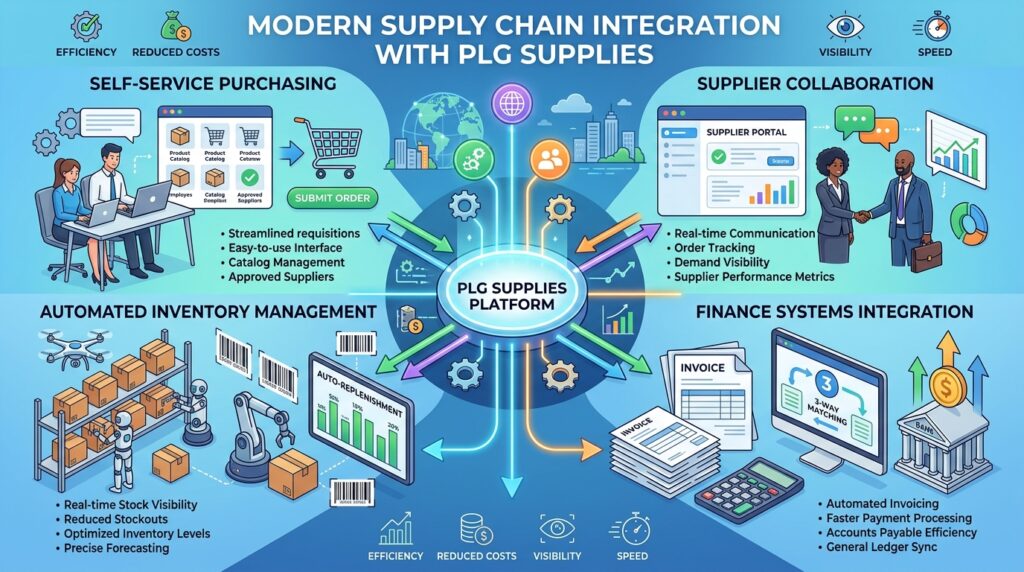
Digital procurement tools can automate much of this work. A unified platform may connect requisitions, purchase orders, receiving records, invoices, inventory transactions, and supplier communications. Amazon Business, for example, describes its Zapro solution as combining purchasing, inventory management, sourcing, order-to-cash, and supplier collaboration in one environment.
The exact capabilities differ by vendor, but the principle is consistent: connect the process from demand to payment.
Core PLG Supplies Solutions
PLG supplies for modern business procurement typically fall into several connected categories. Organizations do not need to adopt every category at once. The right starting point depends on the most visible operational problem.
Self-service procurement catalogs
A self-service catalog gives employees a simple way to find and request approved products. It may include office supplies, maintenance parts, packaging, IT equipment, laboratory materials, or professional services.
A useful catalog should offer:
- Search by plain-language terms.
- Product images and specifications.
- Supplier and delivery information.
- Contract pricing.
- Substitution suggestions.
- Approval requirements.
- Frequently ordered items.
- Department-specific views.
Search quality matters more than many teams expect. If users search for “printer toner” but the system requires a formal item code, adoption will suffer. Natural language search, synonyms, and category suggestions can make the experience more accessible.
Guided buying tools
Guided buying tools help users choose the right purchasing path. Instead of presenting a blank form, the system asks a few questions and recommends the next step.
For example:
- “What are you buying?”
- “Is this a new supplier?”
- “Is the purchase recurring?”
- “Does the item contain sensitive data?”
- “Is the expected value above the approval threshold?”
The system can then direct the user to a catalog item, sourcing event, statement-of-work template, or supplier onboarding workflow.
Guided buying is especially helpful for organizations with complex policies. It turns a policy document into an interactive decision process.
Automated inventory management
Automated inventory management connects procurement decisions to actual stock levels. The system can track receipts, issues, transfers, reorder points, and consumption patterns.
Important features may include:
- Stock-level monitoring.
- Reorder point alerts.
- Safety stock calculations.
- Barcode or RFID scanning.
- Batch and lot tracking.
- Expiration date management.
- Multi-warehouse visibility.
- Demand forecasting.
- Cycle count support.
Automation does not mean every reorder should happen without oversight. Instead, it means the system can identify routine needs and allow teams to focus on exceptions.
If a warehouse typically consumes 100 units of a component each week, the platform can notify the buyer when available stock approaches the reorder point. The buyer can then review supplier lead time, current demand, and price before approving the purchase.
Supplier discovery and sourcing platforms
B2B sourcing solutions help procurement teams identify, evaluate, and compare suppliers. In a product-led model, these tools should make supplier discovery straightforward while preserving sourcing discipline.
Useful capabilities include:
- Supplier search and filtering.
- Request for information workflows.
- Request for quotation management.
- Bid comparison.
- Supplier qualification.
- Risk and compliance checks.
- Contract linkage.
- Performance scorecards.
- Supplier communication history.
A product-led experience can also expose sourcing insights to non-procurement users in a controlled way. A project manager might see why one supplier is recommended, while procurement retains ownership of supplier approval and negotiation.
Spend analytics
Spend analytics tools show where money goes, who buys from whom, and which categories require attention. They help teams identify duplicate suppliers, fragmented purchases, off-contract spending, and savings opportunities.
For PLG adoption, analytics should not be limited to procurement analysts. Department managers can benefit from simple dashboards showing:
- Current department spend.
- Budget remaining.
- Contract utilization.
- Pending approvals.
- Savings achieved.
- Orders by category.
- Supplier delivery performance.
A dashboard that answers practical questions will attract more users than one filled with technical metrics.
Supplier portals
Supplier portals create a shared workspace for purchase orders, confirmations, shipment notices, invoices, documents, and performance data.
They can reduce email volume and improve information quality. Suppliers may update lead times, confirm quantities, submit compliance documents, or respond to sourcing events directly within the system.
The product-led principle applies here as well. Suppliers should understand the benefit quickly. A portal that saves them time, reduces duplicate data entry, and provides clearer payment status is more likely to gain adoption.
Procurement software integrations
No procurement platform operates in isolation. Procurement software integration connects the purchasing experience with the systems that manage finance, inventory, planning, contracts, identity, and customer operations.
Common integration targets include:
- Enterprise resource planning systems.
- Accounting and accounts payable platforms.
- Warehouse management systems.
- Enterprise asset management systems.
- Customer relationship management systems.
- Human resources platforms.
- Identity and access management tools.
- Supplier risk databases.
- Business intelligence platforms.
Integration should support more than one-way data transfer. A requisition may begin in the procurement platform, but budget data may come from finance, inventory information from the warehouse system, and supplier status from a risk platform.
Designing a Product-Led Procurement Experience
A product-led procurement journey should feel simple to the requester while remaining rigorous behind the scenes.
Start with the user’s job
Do not begin by asking which software modules your organization should buy. Begin by identifying what users are trying to accomplish.
Interview requesters, buyers, approvers, warehouse teams, finance staff, and suppliers. Ask questions such as:
- What do you purchase most often?
- Where do requests get delayed?
- Which fields are frequently entered incorrectly?
- Which suppliers do users struggle to find?
- What information is missing when an order arrives?
- Where do employees leave the approved process?
- Which tasks require repeated email follow-up?
These answers reveal the right product-led starting point.
Choose a high-frequency use case
The best first use case is usually important, repetitive, and easy to measure. Examples include:
- Office and workplace supplies.
- Maintenance, repair, and operating supplies.
- Packaging materials.
- IT accessories.
- Routine facilities purchases.
- Standardized marketing materials.
- Common production components.
Avoid starting with the most politically sensitive or technically complex category. A successful pilot creates trust and gives the team useful feedback before it tackles more complicated requirements.
Remove unnecessary decisions
Every additional choice creates cognitive friction. A user should not have to decide which form to use, which code to select, or which approval route applies.
Use defaults where possible:
- Default cost centers by department.
- Recommended suppliers by category.
- Standard delivery locations.
- Preapproved price thresholds.
- Suggested substitute products.
- Automatically assigned accounting codes.
Defaults should remain transparent and editable when justified. The aim is to make the correct choice easy, not to hide decisions from users.
Build around progressive disclosure
Progressive disclosure means showing users only the information they need at each stage. A requester ordering standard printer paper does not need to see every supplier risk field.
However, a procurement manager may need detailed information about supplier ownership, insurance, certifications, payment terms, or environmental performance.
The same platform can serve both audiences by presenting a simple front end with deeper information available when required.
Make expansion feel natural
Product-led growth often expands from individual users to teams, departments, and enterprise accounts. The same pattern can work in procurement.
A department that successfully uses self-service catalogs may later adopt:
- Contract requests.
- Supplier onboarding.
- Budget controls.
- Inventory alerts.
- Spend reporting.
- Automated invoice matching.
- Strategic sourcing workflows.
Expansion should follow a real operational need. Adding features simply because they exist can make the system harder to use.
Integration Blueprint
A thoughtful integration plan prevents PLG supplies from becoming another isolated application.
Map the data
Before connecting systems, identify the key records and ownership rules.
| Data type | Typical source | Procurement use |
|---|---|---|
| Employee and department data | HR or identity system | User access and cost centers |
| Supplier master data | ERP or supplier platform | Approved supplier records |
| Product catalog | Procurement or ERP system | Searchable items and pricing |
| Budget data | Finance platform | Availability and approval checks |
| Inventory data | Warehouse or ERP system | Replenishment and stock visibility |
| Purchase orders | Procurement platform | Supplier execution |
| Receipts | Warehouse system | Three-way matching |
| Invoices | Accounts payable system | Payment and reconciliation |
| Contract data | Contract lifecycle platform | Terms and compliance |
This map exposes duplicate records and unclear ownership. For example, if both the ERP and procurement platform can edit supplier banking details, the organization needs a clear master-data policy.
Select the integration method
The appropriate method depends on the system landscape and risk level.
- APIs support near-real-time exchange between applications.
- Webhooks can notify connected systems when events occur.
- Scheduled file transfers may work for older systems.
- Middleware can transform data and manage complex workflows.
- Native connectors can reduce implementation effort.
- Robotic process automation may help with legacy systems, but it should not replace sound integration design.
Use real-time integration when decisions depend on current information, such as available budget or inventory. Batch updates may be adequate for less time-sensitive reporting.
Define failure handling
Every integration can fail. A supplier update may contain invalid data. An API may become unavailable. A purchase order may be created in one system but not another.
Define:
- Retry rules.
- Error notifications.
- Reconciliation reports.
- Manual recovery procedures.
- Ownership for failed transactions.
- Audit-log requirements.
A resilient process does not assume that every transaction will move perfectly from system to system.
Measuring Success
PLG supplies require a measurement framework that combines procurement outcomes with product usage.
Traditional procurement metrics remain important:
- Purchase price variance.
- Realized savings.
- Contract compliance.
- Supplier on-time delivery.
- Invoice exception rates.
- Purchase order cycle time.
- Inventory carrying cost.
- Stockout frequency.
Add product-led metrics to understand whether the solution is gaining traction:
- User activation rate.
- Time to first completed purchase.
- Catalog search success rate.
- Requisition completion rate.
- Repeat usage.
- Self-service percentage.
- Approval completion time.
- Feature adoption.
- Department expansion.
- Support requests per transaction.
A useful activation event might be “a requester completes a compliant purchase without procurement assistance.” That metric is more meaningful than simply counting account logins.
A simple measurement example
Imagine a company with 2,000 employees. Before implementation:
- 35% of routine purchases use approved channels.
- Average requisition completion time is two business days.
- Buyers spend 15 hours each week answering order-status questions.
- The organization experiences frequent stockouts of common maintenance items.
After launching a guided catalog and inventory alerts, the team could measure:
- Approved-channel usage after 30, 60, and 90 days.
- Average time from search to requisition.
- Reduction in status-related inquiries.
- Change in stockout incidents.
- Reorder accuracy.
- User satisfaction by department.
The goal is not to prove that every metric improved immediately. The goal is to learn where the product creates value and where friction remains.
Common Challenges and Myths
Product-led procurement is promising, but it is not a shortcut around complexity.
Myth: PLG means procurement loses control
In reality, PLG can strengthen control by placing rules inside the purchasing experience. Procurement teams still define approved suppliers, category policies, approval thresholds, and audit requirements.
The difference is that control becomes easier for users to follow.
Myth: Every procurement process should be self-service
Some purchases require expert involvement. Strategic sourcing, high-risk services, regulated materials, and complex capital equipment may need negotiation, legal review, or technical evaluation.
A mature product-led model routes simple purchases through self-service and escalates complex purchases when necessary.
Challenge: Poor catalog data
Inaccurate descriptions, outdated prices, missing specifications, and duplicate items quickly undermine trust. Users may return to email or external websites if the catalog does not reflect reality.
Treat catalog management as an ongoing operating process. Assign ownership, define update schedules, and monitor search failures.
Challenge: Weak adoption by suppliers
Supplier portals may fail if vendors see them as extra administrative work. Explain the benefits clearly, provide onboarding assistance, and avoid requiring suppliers to enter data that already exists elsewhere.
Start with strategic or high-volume suppliers where the value is easiest to demonstrate.
Challenge: Security and access
A self-service environment must not expose confidential pricing, restricted supplier information, or sensitive financial data to the wrong users.
Use role-based access, single sign-on, approval segregation, audit logs, and regular access reviews. Also consider how external suppliers access the platform.
Challenge: Too many disconnected tools
Buying separate tools for sourcing, catalogs, inventory, supplier management, and analytics can create a fragmented experience. Before adding another application, determine whether the current platform already supports the required workflow or can integrate with a specialized solution.
Choosing the Right PLG Supplies Vendor
Choosing the right PLG supplies vendor requires more than comparing feature lists. Evaluate the complete user journey, from first search to final payment.
Vendor evaluation checklist
Look for evidence of:
- Simple onboarding.
- Fast time to first value.
- Self-service configuration.
- Clear user permissions.
- Strong search and catalog capabilities.
- Flexible approval workflows.
- Inventory visibility.
- Supplier collaboration.
- ERP and finance integrations.
- Data export and reporting.
- Mobile access where relevant.
- Transparent pricing.
- Reliable customer support.
- Security and compliance controls.
- Scalable architecture.
Ask the vendor to demonstrate a real scenario using your terminology. For example, show how a warehouse supervisor would find a replacement part, request it, obtain approval, receive it, and trigger a stock update.
A polished presentation may hide usability problems. A hands-on trial reveals them.
Questions to ask vendors
- How long does it take to configure a basic catalog?
- Can business users update catalogs without technical support?
- How does the platform handle duplicate products?
- What happens when a preferred supplier cannot fulfill an order?
- Can users compare price and delivery time?
- How are approval rules maintained?
- Which systems have native connectors?
- How are integration errors reported?
- Can suppliers use the platform without purchasing software?
- What product usage data is available?
- How does the vendor protect procurement and supplier data?
- What happens if the organization changes its ERP system?
The best vendor is not necessarily the one with the longest feature list. It is the one that fits your users, data, governance model, and growth plans.
Implementation Roadmap
A practical implementation can happen in stages.
Stage one: Diagnose the current process
Document the existing journey for several common purchases. Record every form, approval, handoff, system, delay, and rework point.
Also identify the cost of friction. Estimate time spent on manual data entry, order-status questions, invoice exceptions, duplicate purchases, and stockout recovery.
Stage two: Select the pilot
Choose one category, department, or location with clear demand and supportive stakeholders. Define the target user, the activation event, and the first success metrics.
For example, the pilot might focus on maintenance supplies for one distribution center. The activation event could be a completed reorder that updates inventory automatically.
Stage three: Prepare data
Clean supplier records, product descriptions, units of measure, pricing, accounting codes, and approval rules. Data preparation may feel less exciting than interface design, but it often determines whether users trust the solution.
Stage four: Configure the experience
Build the simplest useful flow first. Avoid showing every possible field. Create helpful defaults, plain-language instructions, and clear status messages.
Include exception paths for unusual purchases. Users need to know what to do when a catalog item is unavailable or a new supplier is required.
Stage five: Launch with guided support
A product-led experience should be intuitive, but launch support still matters. Use short demonstrations, in-product prompts, office hours, and quick-reference guides.
Watch real users complete tasks. Do not rely only on survey responses. Observing where they hesitate often reveals hidden friction.
Stage six: Review and expand
After the pilot, examine adoption, cycle time, compliance, data quality, and user feedback. Fix the largest barriers before adding more categories.
Then expand gradually to adjacent workflows, such as supplier onboarding, inventory replenishment, contract requests, and invoice matching.
A Practical Example
Consider a growing software company with offices in three countries and a distributed workforce. Employees need laptops, monitors, ergonomic equipment, event materials, and office supplies. The company’s procurement team uses spreadsheets for smaller purchases and a separate finance system for payments.
Employees complain that approved products are difficult to find. Managers receive approval requests without enough context. Finance staff spend time matching invoices to emails. Procurement has limited visibility into recurring purchases.
The company introduces a PLG supplies model with four changes:
- It creates a searchable catalog with approved products and regional suppliers.
- It adds guided buying questions based on category, department, and budget.
- It connects purchase orders and receipts to the finance system.
- It provides department dashboards for pending requests, spend, and delivery status.
The first result is not simply lower cost. Employees complete routine purchases faster and ask fewer status questions. Managers receive standardized requests. Procurement can focus on supplier strategy rather than correcting basic data errors.
After adoption grows, the company adds automated reorder points for office and event supplies. It also identifies frequently purchased items that should be covered by contracts.
This illustrates an important principle: product-led procurement often begins with convenience, then produces control and strategic insight.
Future Direction
The future of product-led procurement will likely combine self-service experiences with automation, analytics, and human oversight.
Artificial intelligence may help users describe what they need in plain language, classify purchases, suggest suppliers, detect duplicate requests, and identify unusual spending. However, organizations should treat AI recommendations as decision support, especially for high-risk purchases.
Inventory systems may also become more predictive. Instead of waiting for a reorder threshold, platforms can combine usage patterns, supplier lead times, seasonal demand, and production plans to recommend action.
Supplier collaboration will become more connected as well. Buyers and suppliers may share forecasts, order changes, shipment status, quality information, and sustainability data within a common workflow.
The winning organizations will not simply add automation. They will design systems that people trust and understand.
Next Steps
Use these five tips to begin:
- Identify one frequent procurement task that creates visible frustration.
- Define the user outcome that proves the process works.
- Clean the product, supplier, budget, and inventory data behind that task.
- Test the experience with real users before expanding the scope.
- Measure both procurement performance and product adoption.
Start small, but design for connection. A successful pilot should be able to grow into broader procurement software integration, automated inventory management, supplier collaboration, and spend intelligence.
PLG supplies are most effective when they make the approved process feel like the easiest process. By combining intuitive products with strong governance, organizations can improve adoption, strengthen compliance, and build more responsive supply chains. If you are planning a product-led procurement initiative, begin with one workflow, one user group, and one measurable outcome. Then let proven value guide the next step.
Share your experience below: Which procurement task would benefit most from a product-led approach?
FAQs
What are PLG supplies in procurement?
PLG supplies are products, platforms, and workflows designed around product-led adoption in purchasing and supply chain operations. They help users discover, request, approve, receive, and manage supplies with minimal training. The term can include self-service procurement catalogs, supplier portals, sourcing tools, inventory systems, and related operational products.
PLG supplies are not limited to physical goods. The phrase also describes the digital tools that make those goods easier to purchase and manage.
How do PLG supplies differ from traditional procurement software?
Traditional procurement software often emphasizes administrative control, approval processes, and back-office functionality. PLG supplies add a strong focus on user experience, fast onboarding, self-service discovery, and measurable time to value.
Both approaches can include approval rules, supplier management, purchase orders, and spend analytics. The difference is how users experience the process. A product-led system guides users naturally instead of expecting them to understand procurement procedures first.
How can a company implement PLG supplies in its supply chain?
Begin with a high-frequency, low-complexity use case, such as maintenance materials, office supplies, or standardized IT equipment. Map the current process, clean the relevant data, configure a guided workflow, and test it with real users.
Next, connect the workflow to finance, inventory, supplier, and identity systems. Define success metrics, monitor adoption, address friction, and expand gradually. Avoid launching every procurement category at once.
What are the main benefits of PLG supplies for B2B operations?
The main benefits include faster purchasing, higher adoption, better policy compliance, stronger spend visibility, fewer manual tasks, and improved inventory control.
Organizations may also reduce the number of status inquiries, duplicate orders, invoice exceptions, and off-contract purchases. Results depend on data quality, integration, user behavior, and the quality of the implementation.
Do PLG supplies replace procurement professionals?
No. They change where procurement professionals spend their time. Routine purchases can move through self-service workflows, while procurement teams focus more on strategic sourcing, supplier relationships, risk management, negotiations, category planning, and complex buying decisions.
Procurement expertise remains essential. The product simply handles more repeatable work and makes policies easier to follow.
What should organizations look for when choosing a PLG supplies vendor?
Evaluate ease of use, onboarding speed, catalog and search quality, workflow flexibility, inventory capabilities, supplier collaboration, integrations, security, reporting, support, and scalability.
Ask vendors to demonstrate a complete real-world scenario rather than presenting isolated features. The right platform should be simple for requesters, powerful for procurement teams, and practical for suppliers.
Are PLG supplies suitable for large enterprises?
Yes, but large enterprises may need a hybrid approach. Routine and low-risk purchases can use self-service workflows, while strategic, regulated, or high-value categories receive additional review.
Enterprise adoption also requires strong identity management, role-based access, master-data governance, integration architecture, auditability, and change management. Product-led does not mean uncontrolled. It means the system earns adoption by delivering value through the product experience.
You May Also Like: What Is EO PIS: A Complete Business Guide