
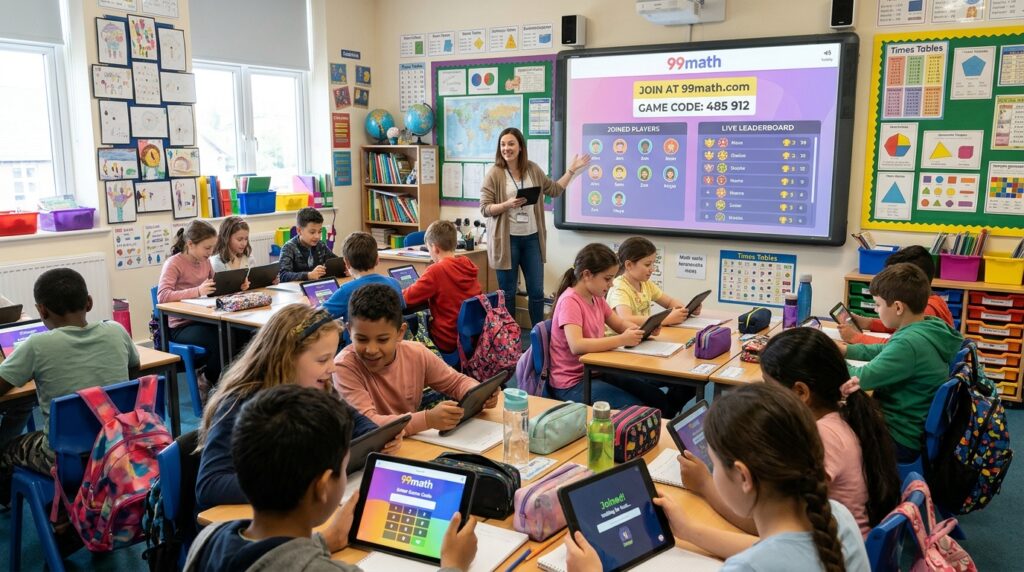

Picture this: the classroom buzzes with energy instead of sighs. Kids lean forward, eyes locked on their screens, racing to solve problems while a live leaderboard updates in real time. No worksheets stacked on desks. No blank stares during timed drills. Just pure focus mixed with friendly competition. That scene plays out every day in classrooms using 99math, and the entry point is simple: the 99math join process.
If you are a K-12 teacher, math interventionist, or parent searching for ways to boost engagement, this guide walks you through every practical step. You will learn how to join 99math as a teacher, how students enter with a game pin, and how the platform turns routine practice into interactive math sessions that actually stick. The goal is clear: help you launch sessions fast, track real progress, and build math fluency without the usual friction.
What Makes 99math Stand Out for Classroom Engagement
99math is a free, browser-based multiplayer platform built for grades 1 through 8. Teachers pick a skill from more than 1,000 options, launch a live game, and students jump in with a short code. The platform generates the problems, scores answers on the spot, and delivers reports that show accuracy, speed, and common mistakes.
Unlike general quiz tools, 99math focuses tightly on math fact fluency. Students practice addition, subtraction, multiplication, division, fractions, and related skills in short, timed rounds. Live group games create shared energy. Individual and home practice modes let students work at their own pace while still earning rewards like pets and badges. Everything runs in a standard browser on phones, tablets, Chromebooks, or laptops. No app downloads and no student accounts required for live sessions.
Teachers often report that setup takes under a minute once they know the flow. That speed matters. When every instructional minute counts, a tool that gets the whole class playing quickly becomes a go-to digital learning resource.
Why Gamified Math Mastery Matters Right Now
Traditional drills can feel repetitive. Students finish problems, check answers, and move on with little sense of progress or fun. Gamified platforms change the equation by adding real-time feedback, competition, and visible growth. Research on fact fluency shows that automatic recall frees working memory for higher-level problem solving. When students master basics through engaging practice, they approach more complex work with greater confidence.
99math delivers that practice in a social format. A live leaderboard keeps energy high without requiring constant teacher direction. After each round, reports highlight who needs extra support and which concepts caused the most errors. Parents can extend the learning at home with short practice sessions that still feel like play. For interventionists working with small groups, the same tools scale down easily and provide clear data for progress monitoring.
The platform also supports different classroom needs. Solo mode works well for individual assessment or remote learners. Team mode encourages collaboration in mixed-ability groups. Home practice assignments let teachers set weekly goals so students continue building skills outside school hours.
How to Join 99math as a Teacher: Step-by-Step Setup
Getting started is straightforward. Open any browser and go to 99math.com. Click the sign-up option and choose the teacher role. You can register with an email address or connect through Google or Clever if your school uses those systems. The process usually takes about a minute.
Once inside, the teacher dashboard appears. Here you manage classes, review past results, and launch new games. Many teachers begin by adding a class roster. You can import names from Google Classroom or Clever, or enter them manually. Having a roster makes long-term tracking easier, though it is not required for one-off live games.
To create your first session:
- From the dashboard, select School Practice or the Group Game option and click Start Now.
- Choose a grade level and a specific skill. Topics are organized clearly and verified by math educators.
- Adjust the settings. You can set the number of rounds, time limit per round, and problem count. Defaults work well for most classes, but you can tweak them for shorter warm-ups or longer practice blocks.
- Decide between solo and team play based on your goal. Solo mode gives clean individual data. Team mode builds cooperation.
- Click Play LIVE. A unique game code (sometimes called a student game pin) appears on your screen.
Display the code on a projector, write it on the board, or share it through your video call chat. Students can join immediately. Late arrivals can still enter with the same code while the session is active. When everyone is ready, start the first round from your host screen.
The host dashboard updates live. You see who has joined, current scores, and activity as rounds progress. Between rounds you can pause to discuss patterns or celebrate improvement. After the final round, a detailed report appears with accuracy rates, response times, and a breakdown of missed questions. These insights help you plan the next lesson without creating a separate assessment.
How Students Complete the 99math Join Process
Students face almost zero barriers. They need only a device with a web browser and the code you provide. No email, no password, and no account creation for live games.
Here is the exact student flow:
- Open a browser and go to join.99math.com (or 99math.com and select the join option).
- Enter the game code exactly as shown. Codes are short and session-specific, so an old code from yesterday will not work.
- Type a display name or nickname. Encourage real first names so you can match results to students easily.
- Choose an avatar if prompted.
- Wait in the lobby until the teacher starts the game.
The entire process often takes under 30 seconds. Once the round begins, problems appear on each student’s screen. Students answer as quickly and accurately as they can. Points accumulate based on speed and correctness, and the live leaderboard keeps the competition friendly.
If a student’s connection drops, they can rejoin with the same code. The platform is designed for real classrooms where devices sometimes freeze or Wi-Fi hiccups. After the session, students see their own results, including rank, accuracy, and improvement highlights such as most improved or best accuracy.
For ongoing practice outside live games, students can create free accounts. This unlocks individual practice, home assignments, and progress tracking over time. Parents can also set up accounts to monitor home practice and encourage consistent effort.
Exploring the Teacher Dashboard and Progress Tools
The teacher dashboard serves as mission control. After your first live game, explore the Progress and Reports sections. You will find class-level summaries and individual student data. Reports show which skills students have mastered and which still need work. Over multiple sessions you can watch growth trends and spot students who may benefit from targeted intervention.
Home practice is another powerful feature. Teachers can assign short daily or weekly goals. Students practice independently, earn in-game rewards, and raise virtual pets. Their results feed back into your reports so you stay informed without extra grading.
Premium options expand these tools further. Teacher Premium and School Premium unlock mixed-skill games, personalized learning paths for individual students, common-mistake reviews, and printable reports suitable for parent conferences or team meetings. The free version already covers live games, basic reports, individual practice, and home practice, so many educators start there and upgrade only if they need deeper personalization.
Practical Tips for Smooth Classroom Sessions
A few habits make the 99math join experience even smoother. Test the process with a small group or yourself before the full class. Confirm that school devices can reach join.99math.com without network blocks. Project the code clearly and say it aloud once or twice for students who struggle with visual details.
Set clear expectations around names. Real first names help you read the leaderboard and reports quickly. If competition feels intense for some learners, emphasize accuracy over pure speed or rotate between solo and team modes. Celebrate growth as much as top scores. The podium screen often highlights most improved players, which keeps motivation balanced.
Use short sessions as warm-ups or exit tickets. A three-round game fits neatly into five to ten minutes. For intervention groups, run focused skill practice and review the report immediately afterward. Share simple data with parents so they understand what their child is practicing at home.
Transition words help keep lessons flowing. After a live round, move straight into a quick discussion of common errors, then launch a follow-up practice set if needed. The platform’s speed supports this kind of responsive teaching.
Addressing Common Concerns and Myths
Some educators worry that competitive games increase anxiety. In practice, many teachers find that the short format and visible progress reduce math stress for students who previously avoided drills. The ability to rejoin easily and the focus on improvement help create a supportive atmosphere.
Others assume students need accounts or that setup will eat class time. The guest join path removes that barrier. A code and a nickname are enough. Teachers who import classes through Google or Clever gain long-term tracking without forcing every student to register on day one.
Internet reliability is another frequent question. Because sessions are short and the join process is lightweight, temporary drops are easy to recover from. Having a backup plan, such as a printed skill sheet for rare full outages, covers most situations.
Next Steps to Start Building Math Fluency Today
Ready to try it? Here is a simple action list:
- Create your free teacher account at 99math.com today.
- Explore the skill list and pick one topic your class needs.
- Run a practice session with a colleague or a few students to learn the host screen.
- Launch a full class game and note the energy in the room.
- Review the report and decide which students need follow-up practice.
- Assign a short home practice goal for the week.
- Share results with students and celebrate both accuracy and improvement.
Once you experience a successful 99math join cycle, the platform often becomes a regular part of the weekly routine. Students ask when the next game is coming. Teachers gain clear data without creating extra assessments. Parents see measurable growth in fact fluency.
Gamified math practice works because it respects how kids learn: through challenge, feedback, and a sense of progress. 99math packages those elements into a tool that fits real classroom constraints. The join process itself is deliberately simple so the focus stays on learning rather than logistics.
Try a session this week. Watch what happens when math practice feels like a game everyone wants to play. Then come back and share how it went. Your experience helps other educators refine their approach and keep improving the ways we support student mastery.
FAQs
How do students join a 99math game?
Students open any web browser and go to join.99math.com. They enter the unique game code (also called a student game pin) that the teacher displays or shares, type a nickname or first name, choose an avatar if prompted, and wait in the lobby. The entire process usually takes under 30 seconds. No app download or account is required for live classroom games.
Do students need an account to join 99math?
No. For live group games, students only need the current game code and a display name. They can join as guests. Student accounts become useful later for home practice, long-term progress tracking, or individual adaptive sessions, but they are completely optional for in-class play.
How do teachers create a 99math join code?
Teachers log into their free account at 99math.com, select a grade and skill from the dashboard, set the number of rounds and time limits, then click Play LIVE. A unique session code appears immediately on the host screen. The teacher projects or shares that code so students can enter it at join.99math.com. Each new game generates a fresh code that expires when the session ends.
Is 99math free for teachers and students?
Yes. Core features including live multiplayer games, basic reports, individual practice, and home practice are free. Teachers can create an account and run unlimited live sessions at no cost. Optional Premium plans add advanced tools such as mixed-skill games, personalized student paths, and printable reports, but they are not required to get started.
What grades and math skills does 99math cover?
The platform focuses on grades 1 through 8 and offers more than 1,000 skills. These include addition, subtraction, multiplication, division, fractions, and related fact-fluency topics. Teachers simply choose the skill that matches current classroom needs, and the system generates appropriate problems automatically.
Can students rejoin if they lose connection during a game?
Yes. If a device freezes or the internet drops, the student returns to join.99math.com and enters the same active game code. They rejoin the current session without needing a new code or restarting the whole game. This design helps keep classroom sessions running smoothly even with occasional technical hiccups.
What is the difference between Solo mode and Team mode in 99math?
Solo mode puts every student in individual competition. Scores and accuracy stay personal, making it ideal for assessment or remote learners. Team mode groups students so they collaborate toward shared scores. Teachers choose the mode when setting up the game depending on whether they want clean individual data or cooperative energy in mixed-ability classes.
You May Also Like: XL NYT Crossword Clue: Answers, Hints, and Solutions